Hair try-on

AI Hairstyle Changer

See a new hairstyle on your own photo before your next salon visit. Choose a cut or texture, keep your natural color or try a new shade, then compare your look.

Explore your next look20 credits

Your next look

Try a new hairstyle

Upload a clear portrait. Choose your hairstyle and keep your natural color or explore a new shade.

Original color by default

Source

—

Output

1K image · 20 credits

20 credits for this runView pricing
Ready
Your photo · a new look

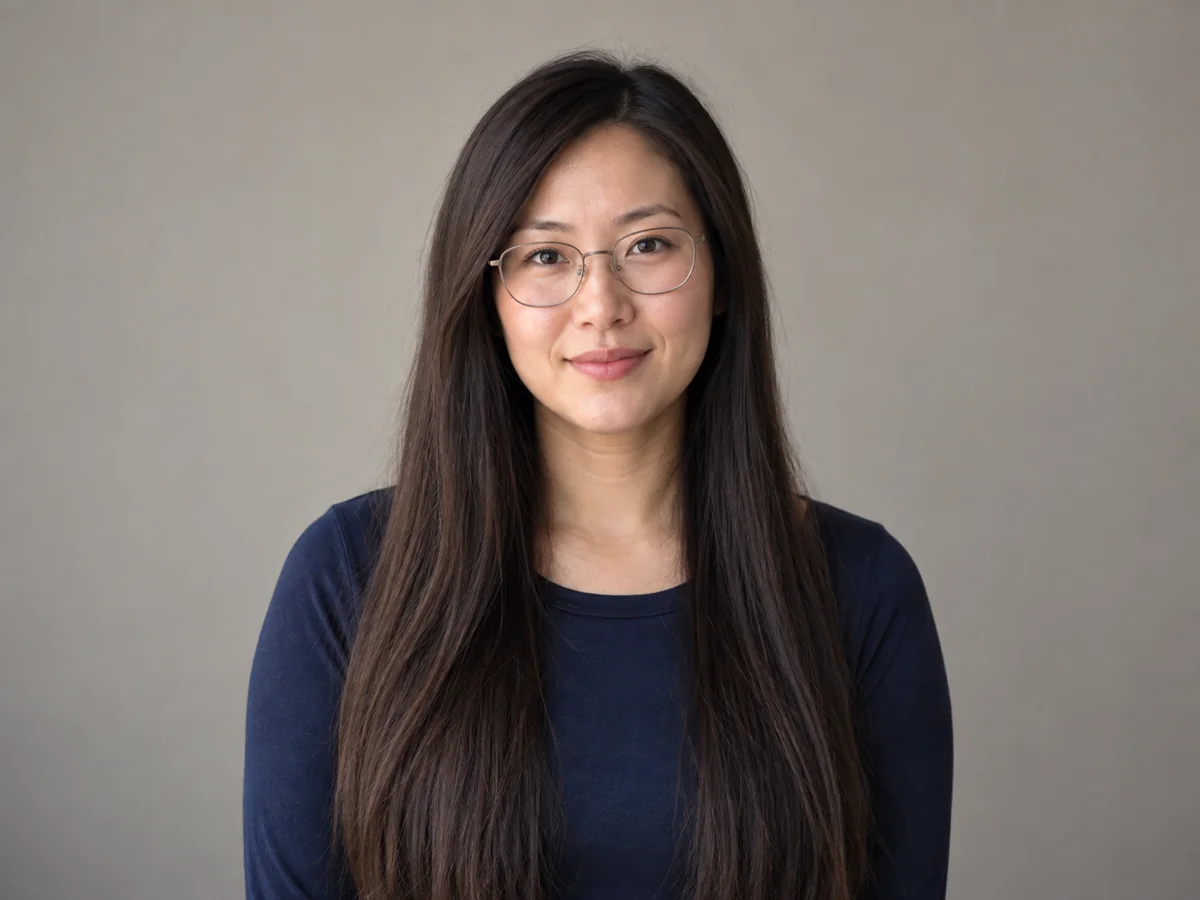
Long hair to shoulder-length

Drag to compare

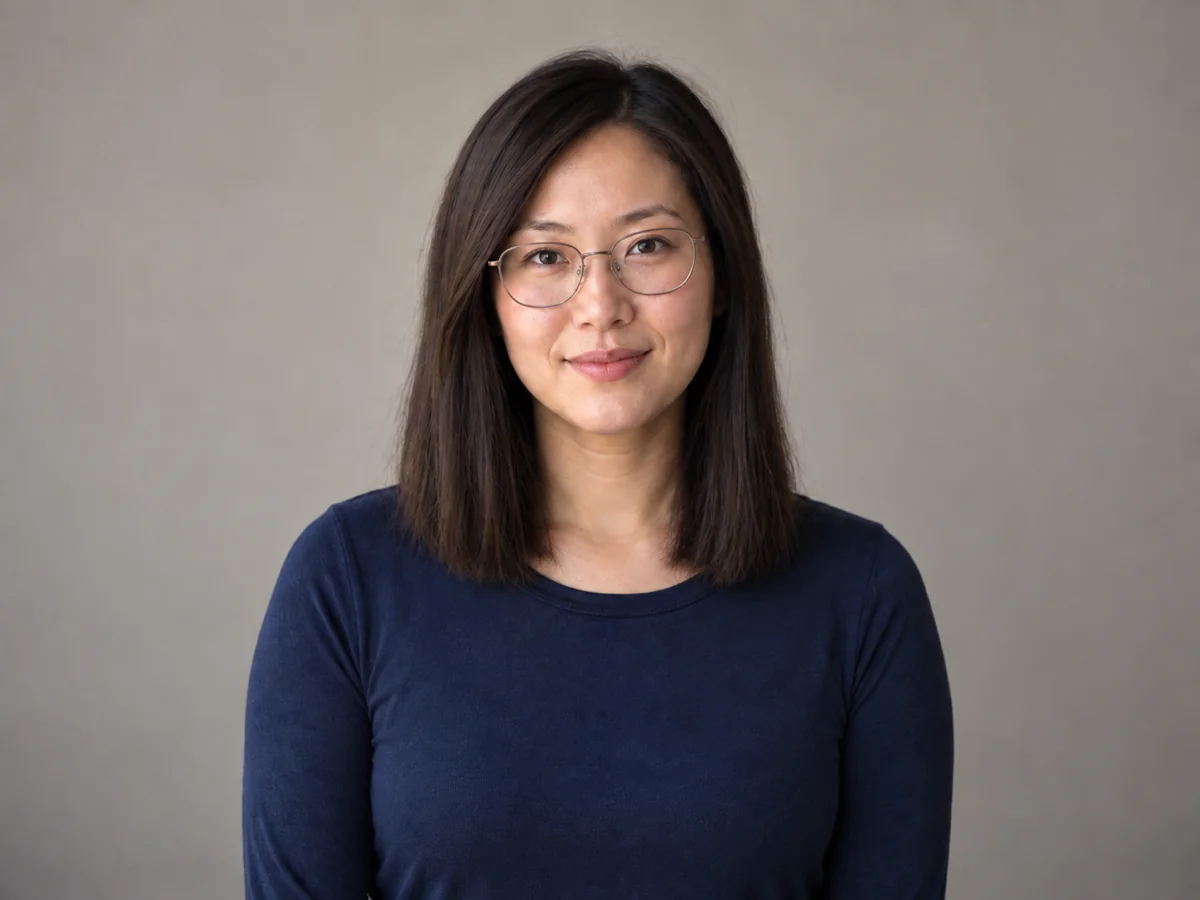
Woman with straight long dark hair, glasses and a neutral studio background
The same woman wearing a shoulder-length dark hairstyle with her glasses and face retained
AfterOriginal

Upload your portrait to explore your own look.

A new perspective

Small hair decisions. A different look.

Man with dark skin and short black hair in a softly lit portrait
Before
The same man with fuller black curls, keeping his face and portrait lighting
After

Curly · Keep original

Short hair, a different curl silhouette

Explore how more curl volume changes the outline around your face. Keep original color selected to focus on shape first. Compare the temples, hairline and curl edges against the source portrait.

Woman with straight long dark hair, glasses and a neutral studio background
Before
The same woman wearing a shoulder-length dark hairstyle with her glasses and face retained
After

Shoulder-length · Keep original

Long hair to a shoulder-length cut

Bring the ends up to the shoulders and see how the new length frames your face. A steady camera angle makes it easier to compare the jawline, glasses and the way the hair sits beside your neck.

Woman with medium brown shoulder-length hair and warm olive skin in window light
Before
The same woman with auburn shoulder-length hair and natural highlights in the same window light
After

Shoulder-length · Auburn

Auburn hair in natural window light

Compare a warmer hair shade with your existing skin tone and lighting. Choose the hairstyle closest to your current cut, then try auburn. Look at highlights and shadows together, rather than judging the shade from its brightest strand.

What is an AI hairstyle changer?

An AI hairstyle changer edits the hair in a portrait so you can explore a different cut, length, texture or color on your own face. IMG AI offers four hairstyle choices and optional hair color changes in a browser. Start with one clear head-and-shoulders photo, choose your look, then compare the original and edited image before downloading.

Bring a clearer idea to your stylist

Save a short or shoulder-length look and use it to discuss the length, face framing and daily styling you want. Your own portrait gives the conversation more context than a haircut saved on someone else. Hair density, growth direction and styling will still shape the cut your stylist creates.

Separate the haircut from the color decision

Try a new silhouette with Keep original first. Once you have a direction, choose black, brown, blonde or auburn for another version. Changing one decision at a time helps you see whether you like the shape, the shade or both.

Explore length and texture on your own face

A long style changes the outline around the shoulders; a curly style adds shape around the head. Compare both with the same source photo to find a direction you want to explore.

How to try a new hairstyle online

  1. 01

    Upload a clear portrait

    Sign in and upload one JPG, PNG or WebP up to 5 MB. Use a front or slight three-quarter view with the whole head visible. Each side should be 256–4,096 pixels, within 16 megapixels. Even light and visible hair edges give you a better starting point.

  2. 02

    Choose your hairstyle and color

    Select Short, Shoulder-length, Long or Curly. Keep original is selected for hair color by default. To explore a dye direction, choose Black, Brown, Blonde or Auburn. Check the 20-credit price, then generate one 1K image.

  3. 03

    Compare and save your look

    Move the comparison slider to check your face, hairline, glasses and background. Download the result you want to keep, or return to it in My Creations. Use the same original photo for your next look so each comparison starts from the same portrait.

IMG AI vs hairstyle filters vs manual photo editing

Choose by how you want to make the decision. IMG AI is a practical fit when you want a hairstyle on your own portrait, a separate color choice and a downloadable image without painting hair edges yourself.

Hairstyle editing workflow comparison
What mattersIMG AIFixed hairstyle overlaysManual photo editing
Your starting pointYour own portrait and four hairstyle choicesYour photo with a preset hair shape layered on topYour photo plus hair selections, layers or a reference
Hair color controlKeep original by default; four optional shadesDepends on the colors provided with the overlayPaint, mask and adjust color yourself
Work before comparingChoose a hairstyle and shade, then generatePosition and scale the overlay to the headSelect hair, shape edges, match texture and light
Review and saveBefore/after slider, download and My CreationsPreview and export depend on the editorControl each layer and export from the editor
Best fitExploring a look before a salon conversationQuickly browsing fixed silhouettesPrecise retouching when you want detailed control

Choose IMG AI for a guided try-on with a visible per-image price. Choose manual editing when individual strands or exact pixel control matter more than a quick preview.

Try your own portrait

Choose a photo that makes comparison easy

Show the hairline

Keep the forehead, ears and top of the head inside the frame. A very tight crop gives a longer or fuller style little space to appear.

Keep texture visible

Use a sharp original with soft, even light. Fine curls, coils, flyaways and gray strands are easier to compare when they are visible in the source.

Choose an unobstructed photo

Hats, head coverings and hands can hide the hair you want to change. Use a photo where the intended hair area is visible; a covered area is not a reliable starting point for a full restyle.

AI hairstyle changer questions

Can I try a hairstyle without changing my hair color?

Yes. Keep original is the default hair color choice. It asks the editor to retain the original shade, undertone, highlights and gray while changing the hairstyle. Select a new color only when you want to explore a dye direction.

Which hairstyles and hair colors can I try?

IMG AI offers short, shoulder-length, long and curly styles. Hair color choices are Keep original, Black, Brown, Blonde and Auburn. These are broad directions, so the precise fringe, strand arrangement and finish can vary between images.

Will the hairstyle changer keep my face the same?

The edit is instructed to change hair while retaining your face, expression, skin tone, glasses, pose and background. Review the comparison before saving: AI editing can shift small details, especially around glasses, ears and partially hidden hairlines. Use a clear photo of one person for the most useful comparison.

Can I use the result to decide what to ask my hairdresser for?

Use it to explain a preferred length, shape or shade on your own face. A stylist can then account for your natural texture, density, previous color and styling routine. The image helps communicate an idea; those real hair conditions determine how the finished cut or color will look.

How much does it cost, and what happens if my connection drops?

One 1K hairstyle image costs 20 IMG AI credits, shown before generation. Changing your selections is free. If the connection drops, recover the existing task or check My Creations. A confirmed failed task returns its reserved credits; a task still processing remains attached to the original request.

What photo should I upload, and how is it handled?

Upload one clear head-and-shoulders photo as a JPG, PNG or WebP up to 5 MB, 256–4,096 pixels per side and no more than 16 megapixels. Sign-in is required for upload and generation. Photos are processed to create the requested edit, and results are available in your account. See the IMG AI privacy policy for data handling details.

IMG AI privacy policy