
AI Recolor Image

IMG AI recolors one element of a photograph at a time. Name the thing that should change — a jacket, a car, a wall, a product — pick the new color, and the model repaints only that element while it keeps the original light, shadows, reflections, and the rest of the frame exactly where they were.

JPG, PNG, WebPUp to 20 MB256–8,192 px per side1K, 2K, or 4K output

Object color

Recolor one thing in a photo

Upload a photo, name the one element that should change color, and pick the new shade. Everything else in the frame stays put.

Upload image(0/1)
Name one thing

Use a few plain words. Only this element is repainted.

red

Source

—

Output

1K render · 20 credits

20 credits for this runView pricing
Ready
One element repainted · rest preserved

Your recolored image will appear here

Upload a JPG, PNG, or WebP between 256 and 8,192 pixels per side, name the element to change, then pick the new color.

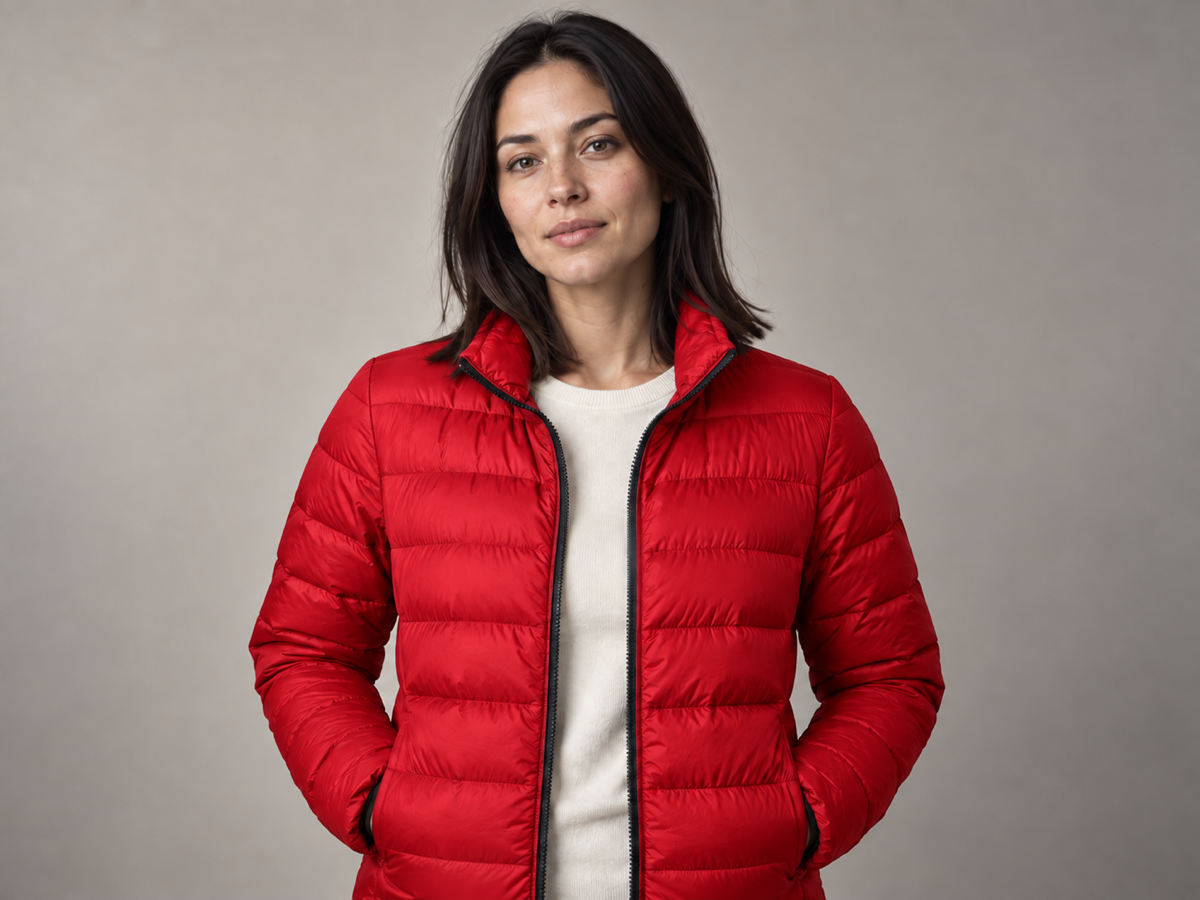
Concept example of the same portrait with only the puffer jacket recolored to a saturated red, lighting and background unchanged
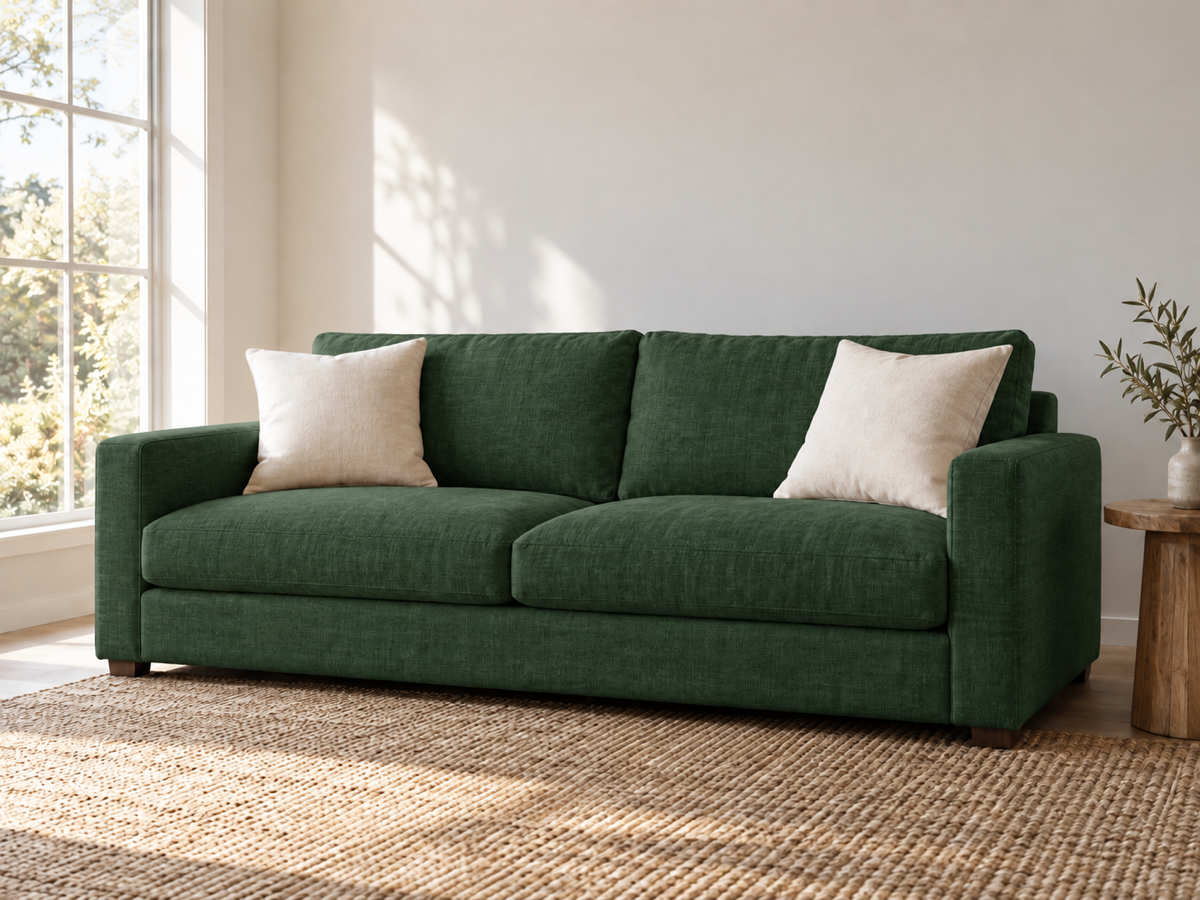
Concept example of the same living room with only the sofa recolored to deep green, cushions, rug, and daylight unchanged
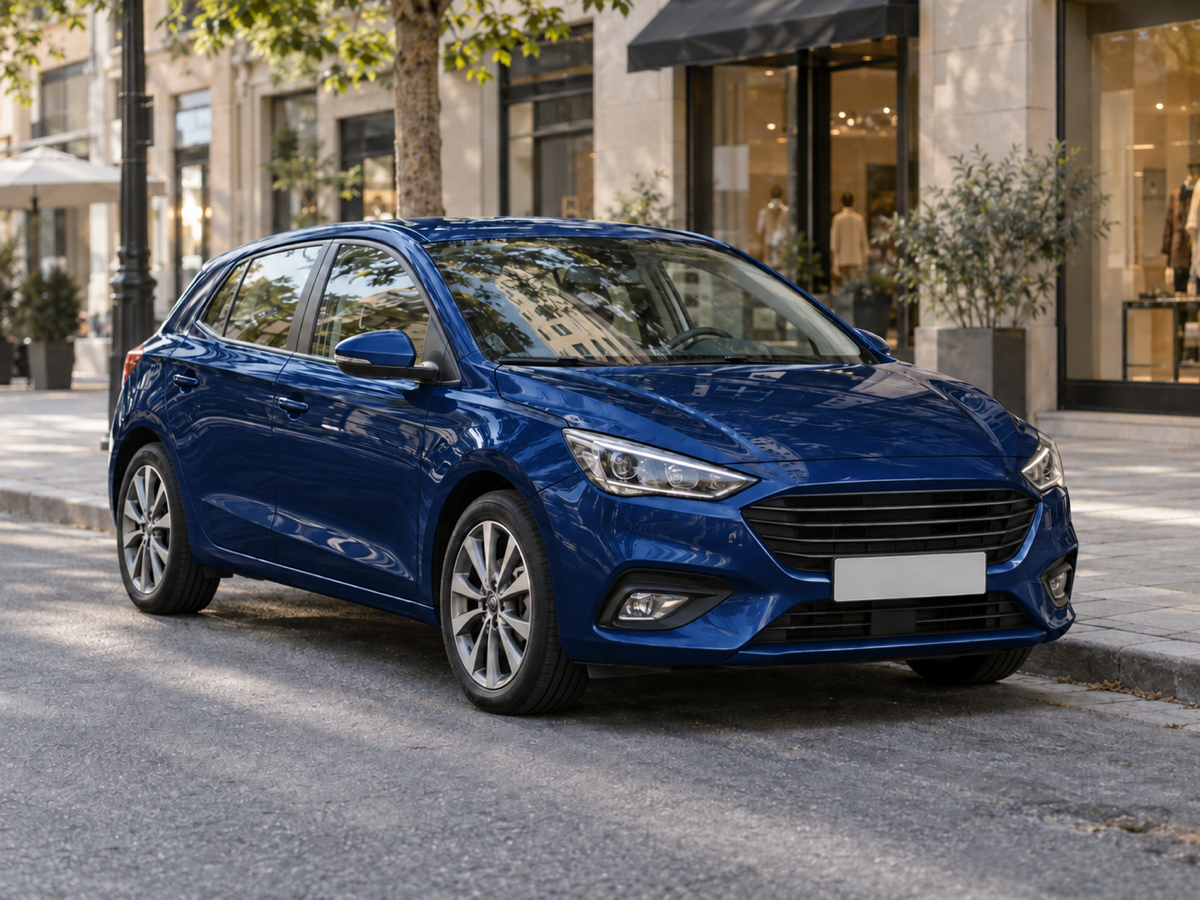
Concept example of the same parked car recolored to navy blue with the street, buildings, and reflections unchanged

Concept examples, not measured customer results.

The direct answer

What is an AI image recolorer?

An AI image recolorer changes the color of a specific object or area inside an existing photo without rebuilding the picture around it. You point at what should change — in words like "the jacket" or "the front door" or "the car" — choose the new shade, and the model repaints that one element while leaving the composition, the people, the background, and the lighting exactly as they were. It is the difference between editing a photo and re-generating one.

That single-element focus is what separates recoloring from the three jobs it is most often confused with. Colorizing adds color to a black-and-white photo. Removing a filter neutralizes a color cast across the whole frame. Generating an image creates a new picture. Recoloring assumes the photo is already right and changes only the color of one thing in it, which is exactly what a product team needs when one SKU has to become another, or what a designer needs when a client asks for the same scene in a different palette.

Jobs this AI recolor tool is built for

Show one product in every colorway

A single well-lit packshot can become the whole product line. Recolor the item to each launch color, keep the background, the contact shadow, and the label position identical, and the set reads as one shoot instead of a paste-up. Check the label, the hardware, and the reflective edges after each pass, because those are where a repaint drifts most.

Swap a garment color for a listing or a lookbook

When a model shot is already approved, only the clothing needs to change for the next variant. Name the garment and the new shade, and the pose, the face, and the studio light stay untouched. Inspect the seams, the zips, and the folds at full size before you publish — a recolor should follow the cloth, not flatten it.

Test a palette on a room, a car, or a wall

Paint, upholstery, and vehicle colors are hard to picture from a swatch. Recolor the sofa, the wall, or the car to two or three candidate shades and compare them in the actual light of the room or the street. Use the result to choose, then make the change for real.

How to recolor an image with AI

  1. Upload one photo

    Sign in, then add a JPG, PNG, or WebP up to 20 MB with each side between 256 and 8,192 pixels and no more than 40 megapixels. IMG AI checks the file in the browser and again on the server, so a damaged or mislabelled image is refused before any credits are reserved. Start from the largest, cleanest source you have.

  2. Name one element and pick the new color

    Describe the single thing that should change color in a few plain words, then choose a swatch or enter your exact brand hex. These are prompt presets this page owns, not sliders on the model, and the workbench shows the credit cost for the size you selected before you submit. One run produces one finished image.

  3. Compare, then download or discard

    Drag the divider across the result and inspect the recolored element at 100%: its edges, its reflections, and any text nearby. Download when it holds up at the size you actually need. If the connection drops or you refresh the tab, IMG AI recovers the same task identity instead of starting a second paid job, and the run stays visible in My Creations.

Concept examples

Before and after a single-element recolor

These owned concept pairs show what recoloring one element does to a garment, a piece of furniture, and a car. They are not measured IMG AI customer results.

Concept example of a studio portrait of a woman wearing a blue quilted puffer jacket against a neutral backdrop
Concept example of the same portrait with only the puffer jacket recolored to a saturated red, lighting and background unchanged
RecoloredOriginal

Blue puffer jacket recolored to red

Clothing is judged on seams and folds. The new color should follow every quilt line and cast shadow so the jacket still reads as fabric, and the face, hair, and backdrop must be untouched. If the trim or the zip changes color too, the target was too broad.

Jacket → red · 2K

Concept example generated for this page; not a measured customer result from IMG AI.

Concept example of a beige linen sofa in a bright living room with a rug, cushions, and a large window
Concept example of the same living room with only the sofa recolored to deep green, cushions, rug, and daylight unchanged
RecoloredOriginal

Beige sofa recolored to deep green

Furniture is judged on material response. The recolored sofa should keep the weave, the cushion creases, and the soft daylight falloff from the window while the rug, the wall, and the cushions stay in their original tones.

Sofa → deep green · 2K

Concept example generated for this page; not a measured customer result from IMG AI.

Concept example of a silver compact car parked on a city street beside a curb and storefronts in daylight
Concept example of the same parked car recolored to navy blue with the street, buildings, and reflections unchanged
RecoloredOriginal

Silver car recolored to navy blue

Cars are judged on reflections and glass. The paint should change while the windows, the chrome, the tyres, and the street reflections remain identical, because a repaint that swallows the highlights makes the car look flat and wrong.

Car → navy · 2K

Concept example generated for this page; not a measured customer result from IMG AI.

What this AI recolor tool actually does

The page exposes one reviewed recolor pass. The target description and the color are the only inputs, and they are prompt presets this page owns rather than independent backend parameters. There is no drawn mask, no batch queue, and no pixel-identical mode here because this workflow does not perform those jobs.

One named element, lighting-aware

The recolor follows the light already in the photo, so highlights, shadows, and reflections on the chosen element respond the way that material would in that color. The result looks photographed rather than filled in.

Everything else preserved

The instruction protects the people, faces, identity, pose, background, framing, crop, perspective, and every element that was not named. It is a color change, not a redesign or a re-generation of the scene.

Reviewable and recoverable output

The original and the recolored result sit in one comparison view, and the finished task stays in My Creations so you can return to it instead of buying a second run.

Recolor, colorize, or remove a cast?

These three jobs get confused constantly. Pick by what you actually need to change about the photo.

The problemAI Recolor ImageAI Image ColorizerRemove Filter from Photo
Best forChanging the color of one element in a color photoAdding color to a black-and-white or faded photoNeutralizing a global color cast or preset filter
What changesThe chosen element's colorGrayscale becomes full colorThe whole photo's white balance
What it will not doAdd color to a monochrome photo or repaint everythingRecolor a modern color photo or target a single objectChange any object's individual color
Cost on IMG AI20–40 credits10 credits20 credits

Images that recolor well

A high-resolution, well-exposed photo gives the pass the most structure to read. A clearly separated element, visible material detail, and soft, plausible lighting all help the repaint follow the original form. Recoloring works best as a single change on a photo that is otherwise finished.

Limits you should know

  • It works from your written description, not a drawn mask. A vague target can recolor the wrong area, so name the element precisely in a few plain words and check the result at 100%.
  • It re-renders the image, so it is not pixel-identical to the source. Fine patterns, small text, jewellery, and repeating textures can shift slightly; compare identity-sensitive and text-heavy details carefully.
  • Scenes where the target is very low-contrast, mostly hidden, or tangled with similar-colored objects may need a clearer source or a second attempt.
  • It changes the color of an existing element. It does not add color to a black-and-white photo and it does not remove a global color cast; those are different tools.
  • You must own or be authorised to process the source, and you are responsible for disclosing AI involvement wherever a platform, publication, or client requires it.

IMG AI vs Fotor vs AI Ease

Three tools answer a recolor query with three different products: a focused recolor pass inside a wider image account, a color changer inside a large browser editor, and a free standalone recolor page. Public product pages were reviewed on 19 September 2026; confirm current terms on each vendor site before you commit.

IMG AI

One reviewed recolor pass inside the same account, credits, and history you already use for the rest of IMG AI.

Sign in, upload one JPG, PNG, or WebP up to 20 MB, name the single element to change, pick a swatch or a brand hex, choose the output size, confirm the credit cost, run one pass, drag the split comparison, and download. The run is recoverable and appears in My Creations.

No drawn mask, no batch queue, and no pixel-identical mode. Recoloring is driven by the element you name and the color you choose, and the output is a re-render rather than a byte-for-byte copy.

Open the IMG AI tool

Fotor

A color changer built into a full browser photo editor with many other adjustments alongside it.

Fotor presents an image color changer where you upload a photo, describe the area you want to recolor, and apply the color, then continue editing in the same workspace.

The recolor is one feature among a full editing suite, so the workflow carries the editor around it, and the free tier and export terms are set by Fotor rather than by a single-pass tool.

Public product page reviewed for this comparison.

AI Ease

A free standalone recolor page aimed at quick object color swaps in the browser.

AI Ease offers preset object options or a text prompt to choose the area, a color selection, and a single Generate action that returns a recolored image to preview and download.

Its recolor is one action inside an AI Ease account, and its own free and paid tiers and export terms are set by AI Ease rather than by a single-pass credit cost.

Public product page reviewed for this comparison.

Also worth knowing: general image generators such as ImageGPT and VisualGPT expose recolor as one prompt inside a much larger model menu, which is flexible but leaves the recolor instruction to you. IMG AI is the better fit when the job is specifically "change this one thing to this exact color, keep the rest identical" and you want the run tracked.

Privacy, rights, and responsible use

Upload only images you own or are authorised to process, and be careful with identifiable people who cannot consent. Do not use this tool to misrepresent a real person, to alter a product so it no longer matches what is sold, or to fabricate evidence. IMG AI keeps the tracked task on your account and the result in My Creations. Read the privacy policy before uploading private or client material.

File and credit specifications

Input
JPG, PNG, WebP
Maximum file
20 MB
Side range
256–8,192 px
Maximum area
40 megapixels
Output sizes
1K, 2K, or 4K
Task cost
20 / 30 / 40 credits
Controls
Target description and color
History
My Creations

AI Recolor Image FAQ

What does an AI recolor tool do?

It changes the color of a specific object or area inside an existing photo. You upload a picture, name the one element that should change — for example the jacket, the car, the wall, or the product — and choose the new shade. The model repaints only that element and keeps the people, the background, the framing, and the lighting as they were.

Can I recolor just one object without changing the rest?

Yes, that is the whole point of the tool. The instruction explicitly protects every element that was not named, including faces, identity, pose, background, crop, and camera angle. It is not a full-picture filter, so it will not shift the tone of the whole image the way a preset would. Always compare the result at full size to confirm the protected areas are untouched.

How should I describe what to recolor?

Use a few plain words that identify one thing, such as "the jacket", "the front door", or "the car". There are quick-pick chips for common targets, and you can type your own description in the same plain style. Precise, singular wording works best: naming two objects or a vague area makes the repaint less predictable.

Which files and sizes can I upload?

One JPG, PNG, or WebP image up to 20 MB, with each side between 256 and 8,192 pixels and no more than 40 megapixels in total. The file is validated in the browser and again on the server, so a damaged or mismatched image is rejected before any credits are reserved. Choose 1K, 2K, or 4K for the output.

How much does one recolored image cost?

A run costs 20 credits at 1K, 30 credits at 2K, or 40 credits at 4K, shown next to your balance before you submit. A failed task refunds automatically, and a dropped connection or page refresh recovers the same task instead of charging twice. Current plans are listed on the IMG AI pricing page.

Can I use a recolored image commercially?

IMG AI provides the tool and the credits; the rights and the disclosure decision are yours. Use only sources you own or are authorised to process, be careful with identifiable people and branded products, follow each marketplace or platform policy on AI-edited imagery, and disclose AI involvement whenever a client, publication, or regulation requires it.

First-party limits come from the IMG AI recolor backend. Competitor behaviour in the comparison above was read from public product pages on 2026-09-19 without linking out. Move to the workflow that matches what the image actually needs.